This website and its content, including but not limited to the 'AC' logo and 'AdjusterConsole', are protected by copyright law.
You are granted a limited, non-exclusive, non-transferable, revocable license to access and use the materials on this website solely for personal use.
By accessing or using this website, you agree to the following terms and conditions:
Restrictions on Use
You may not, without the express written permission of AdjusterConsole, LLC:
Copy, download, reproduce, distribute, publish, display, perform, modify, create derivative works from, transmit, or otherwise exploit any part of this website or its content, in whole or in part.
Use this website or its content for any illegal, unethical, or unauthorized purposes.
Access or use any proprietary information, documents, or content not owned by AdjusterConsole, LLC in a way that is not expressly authorized.
This license applies to all versions of the code and content previously released, as well as all future versions. Any prior statements made regarding permission to use are hereby revoked.
Third-Party Trademarks and Proprietary Information
All trademarks, service marks, proprietary information, and/or documents not owned by AdjusterConsole, LLC that appear on this website are the property of their respective owners, who may or may not be affiliated with, connected to, or sponsored by AdjusterConsole, LLC. Such proprietary information, documents, and content should be treated as confidential and used solely for their intended and expressly authorized purposes. Unauthorized use, distribution, or disclosure of such proprietary information is strictly prohibited.
Disclaimer of Warranties
This website, its content, and the code provided are offered "as is", without any warranty of any kind, either express or implied. The author makes no representations or warranties regarding the accuracy, completeness, or suitability of the website or its content for any particular purpose.
Limitation of Liability
To the fullest extent permitted by law, AdjusterConsole, LLC shall not be liable for any direct, indirect, incidental, special, consequential, or punitive damages arising out of or relating to your use of or inability to use the website or its content, even if advised of the possibility of such damages.
Indemnification
You agree to indemnify, defend, and hold harmless AdjusterConsole, LLC from any claims, liabilities, damages, losses, or expenses (including reasonable attorney's fees) arising from your use of the website or its content, or your violation of these terms and conditions.
Amendments to the Terms
These terms and conditions may be updated or modified at any time without prior notice. It is your responsibility to review these terms regularly. By continuing to use this website, you agree to any changes.
Governing Law and Jurisdiction
These terms and conditions are governed by and construed in accordance with the laws of the United States of America. Any disputes arising under or related to these terms and conditions shall be resolved exclusively in the courts of United States of America.
Contact Information for Licensing Inquiries
For inquiries regarding licensing or permission to use this code in ways not covered by this license, please contact [email protected].
By using this website or its content, you acknowledge that you have read, understood, and agree to be bound by these terms and conditions. Failure to comply with these terms may result in legal action.
I have read and understand these terms and conditions
Copied!
Copied --
Next --
Remaining --
Copied --
Next --
Remaining --
Copied --
Next --
Remaining --
♦ Appearance ♦
♦ Toggle On/Off ♦
♦ Help ♦
♦ Metrics ♦
♦ Profiles ♦
☰
Browse Full SOPs
PT Transfer
Is the Repair Facility able to diagnose to cause of failure and overhaul if needed?
Has the Repair Facility ever serviced the vehicle before?
Can a test drive be performed if needed?
Has there been teardown that would prevent a test drive or is the vehicle inoperable due to failure?
Did the Repair Facility tow the vehicle?
Has the cause of failure been identified?
Does the Repair Facility have an itemized estimate available?
Has the Repair Facility's info and contact info been verified?
What is the preferred method of contact?
Have the PT claim expectations been reviewed with the Repair Facility contact?
Have you provided the Repair Facility with the assigned adjusters name, direct extension, and e-mail?
Is there any other relevant info that will assist the adjuster?
Status Note
What are we waiting on?
Photos from the RF to
Do they know what we're looking for and how to get it to us?
Have parts and labor been verified and entered into the claim?
Yes
Any relevant info?
What are the next steps?
Anything to look out for?
Any notes, in general?
ENG/TRANS DYE: 12.49/OZ
SEALANT/RTV: 13.37 PER 3.5OZ
Payments Fax
303-456-1039
Records Fax
303-420-4722
CarShield
800-430-1705
Roadside Assistance
866-222-7869
Rental
636-626-2189
Main
800-531-1925
Common questions
And Their Answers or Where to Find Them.
⧫ Where can I find tracking information?
⧫ Am I supposed to open a claim or can this end in interaction?
⧫ Only some of the authorized repairs are going to be completed.
How do I make the estimate match the invoice?
⧫ I have a CH on the phone and they don't want to pay OOPC.
They want to get the work done at another repair facility.
Where do I send them?
⧫ The Repair Facility is saying they didn't get paid.
It shows they were paid in our system.
How can I help?
Note the claim number.
Go to the Parts Authority home tab.
Click 'Track Orders and Invoices'.
Select the 'P.O. Number' search option
Input the claim number into the search box and click 'Search'.
Click on the order number.
This will show relevant info such as the tracking number, address shipped to, etc.
Clicking on the tracking number will show you current shipment status.
You MUST open a claim if:
The part has coverage.
There is a mileage issue. Negative mileage, for example.
There is a VIN issue.
A claim doesn't need to be opened if:
The part is PNLC unless VIN or mileage issues need to be addressed
The CH vehicle is not at the RF.
The RF doesn't have a verified failure.
Even if the claim will be denied, one must be opened if the part is listed.
Even if the part is not listed, an open claim is needed to correct mileage or VIN issues.
Reauthorize the claim using the 'Reauthorize' button in the actions tab of CMS.
Go to the estimate in CMS and lock the claim.
Open the authorized section of the estimate and find the items that are no longed needed.
Select the checkbox next to each of those items.
Click 'Modify Claim Item'.
For part line items, set the Repair Facility, AAS, and Authorized prices to $0.00.
For labor line items, set the Repair Facility, AAS, and Authorized labor hours to 0.0.
Click 'Save' in the bottom right corner when finished with each item.
IMPORTANT - Do NOT change any PART line item to a QUANTITY of 0.
There are 2 things the CH will need.
The first is a list of Repair facilities that work with us:
The CH will go to americanautoshield.com
At the TOP of the home page, just to the right of center, is a button labelled 'Claims'.
When they click on that, there is a drop-down menu with a link to 'Find a preferred repair facility'.
That link will take them to the PRF page where they can find a list of repair facilities.
The second is 2 questions:
Do you use Mitchell ProDemand?
Do you allow parts to be shipped in?
The CH will call Repair Facilities and ask them those questions.
A repair facility that uses ProDemand and allows us to ship parts is most likely to have no OOPC.
PepBoys as a national chain uses Mitchell and, generally, allows parts to be shipped in.
'Paid' status in CMS just means that the card was sent
It does not indicate if any money was actually dispersed.
In order to resolve the issue:
Verify the payment information on file and fix any errors.
Notate the claim stating the situation and that you verified payment info.
Note the claim number, Contract Holder name, and RF payment information.
To verify whether or not payment has been released and to release a secondary payment, contact Payments.
Call the payments line, explain the situation and provide any requested information
Payments will inform you if the card was ran or release payment if it hasn't.
Inform the RF of the outcome.
Mileage Discrepancies
Is the contract a Term contract or a Month-to-Month Contract?
Is the vehicle over 90 days in coverage?
What kind of mileage discrepancy is being reviewed?
Does the contract have the Commercial or Ride Share surcharge?
Contact the customer and ask about usage for potential Commercial/Rideshare use. Did the customer admit to commercial or Ride Share use?
Proceed with the claim as normal.
Do not send to Client Relations.
Task to Client Relations to review.
Refer to the Tasking Client Relations Job Aid.
How to Proceed with a Mileage Calculation
Verify the breakdown mileage with the Repair Facility.
If the Repair Facility has any records the fit the required criteria, request them.
If the Repair Facility doesn't have a record available to be used immediately, request verifiable records from the customer.
If none are available or they are uncooperative, a CARFAX report may be used.
Records should be as close to date of sale as possible
No older than 12 months prior to date of sale.
Must be prior to date of sale
Perform a mileage calculation using the SOP available in the Knowledge Base.
Parts Pricing - PA and Sourcing
Is the Repair Facility part OEM or AM?
Is the MSRP over $250.00?
Is the Repair Facility charging more than OEM MSRP?
If the Repair Facility won't match, is shipping an option?
PA Sourcing
Enter the CH VIN into PA
If the RF is using OEM, search using the OEM part number
If the RF is using AM, seach using the part name
Filter results to show only BETTER or above Quality Rating.
Sort by clicking 'price' near the top-right of the screen.
First option will be any results that have an OES or OEM tag.
If there are no parts with an OEM or OES tag, filter results to
show only BEST or above Quality Rating.
Remember:
Sort by price again after changing any filter options.
We can only use pricing from parts that are in stock.
If RF is using OEM and there are no options searching by
the OEM part number, search again using part name
Does PA have options?
PA Pricing
Is the PA LIST price over $250.00?
This is your part. - PA List is your MSRP.
Is the RF charging more than PA List?
If the RF won't match, is shipping an option?
Is PA cost over $250.00? Either way, note the MCE PA part.
This is your part. - PA List is your MSRP. - PA Cost is MCE.
Is RF charging more than AM Cost
If the RF won't match, is shipping an option?
In House Sourcing
First, key in the MCE part from PA and source using the 'Parts Authority' button in CMS.
AM - Obtain the OEM part number from ProDemand, PA, or Forte.
Key in another instance of the part using the OEM PN as the RF part number. OEM and AM - Go to the estimate page and select the part.
Click the 'Source Parts' button
On the Estimate Adjudication page, click the down arrow next to the sourced part.
Select 'Choose Source'.
On the right side, the column listed under 'Total' will show the total cost of each source.
MCE is the best pricing available from all vendors.
If MCE is over $1000.00, allow 2 hours for sourcing to complete.
If there are no PA options and nothing returns from in house, auth MSRP.
Before shippping or calling the CH for OOPC, always give the RF a chance to match
Do Not Order These Parts Aftermarket
Engine and Internals
Rocker Arm
Camshaft
Crankshaft
Lifter
Balance Shaft
Piston
Valve Spring
Push Rod
Cylinder Head
Cam Rocker
Block
Oil Pump
Timing Components
Transmission and Other DriveTrain
Torque Converter
Valve Body
Shift Solenoid
4x4 Switch
Clutch
Gears
Shafts
Differentials
Transfer Case (Including Internals)
ISM (Shift Module on Certain Transmissions)
General
Turbocharger
Harmonic Balancer
Radiators that begin with "OR"
LCD Screens and Radios
Drive Shafts
Power Steering Racks
Electrical Test: .3
Code Pull: .3
With Live Data Monitoring: add .2
Electronics Reset: .3
Wire Repair: .2 per wire, Max 2 hours
Alternator Diag: .6
Pin Point Test: .4
Fuel
Fuel Pressure Test: .5
Injector Node Test: .5
Drain and Fill Fuel Tank: .5
Smoke Test - Emissions: .6
Chassis Ears Noise Isolation: .3
Vacuum Test 4WD actuators: .5
Bleeding Lines: .7
Dye Test for Engine: .5 - 1
Cleaning: .2 - .4 if covered by contract
Additional Info
Coolant flushes after water pump replacement are to be
used only if there is contamination in the system from a covered
failure.
Anything that is part of the R/R procedure cannot be counted
towards diag as it is considered overlap.
Always check the labor guide FIRST.
Date
Mileage
ī
Service
Inception
Record
Record
Record
Record
Record
Record
ī = Record to use for Inception calc.
Select Options...
Parts Resolution
What Qualifies as a Parts Resolution?
The wrong part was ordered or delivered.
The part was delivered broken/inoperable
The part has failed after install but within 30 days of repair
The part has failed after 30 days but within warranty period (typically within 12 months/12,000 miles of repair)
The part was not installed and is no longer required
How is a Parts Resolution Done?
Note the RF contact name, mileage, labor rate, and labor time for the part.
Select the 'Parts' tab in CMS and click 'Parts Ordered'.
Click the checkbox next to the part. Select 'Parts Resolution'.
Select the repair facility and click 'Next'.
Select the repair facility contact.
Enter the mileage, labor rate and hours, if the part was installed, and the case reason.
Select that you have notified the RF about contact time.
Enter a detailed description of why the part was wrong or how it failed.
Be as specific as possible, especially for incorrect parts.
Click 'Next' then 'Finish'
Upload anything the RF sent in to documents.
Notate the claim
Tesla
When a repair facility calls in a Tesla claim, start an interaction and take note of the following information:
Contract Number
Interaction Number
Contract Holder's Name
Repair Facility Name
Repair Facility Phone Number
Repair Facility E-mail Address
Repair Facility Contact Name
Failed Component(s)
Do Not Use vs STOP-NO CLAIMS ALLOWED
Shops that have Do Not Use in the RF name are just duplicate accounts.
The Do Not Use is in reference to that profile. The RF will have another
without the Do Not Use tag.
However, if you see STOP-NO CLAIMS ALLOWED, do not start a new claim.
Inform the RF that you need to review coverage and will call them back.
Call the CH and inform them that we are unable to open new claims with their RF.
Apologize for the inconvenience, and help them with finding a new RF and towing.
If the CH escalates, transfer the call to the Escalation team for handling.
Do not share any details or speculation about the RF to the CH or anyone from the RF.
Document all actions taken in the notes.
Don't let the big red banner scare you off.
The notes will indicate if any adjuster can continue the claim or if
you should task the assigned ADJ with updates or actions needed.
And of course, if you are not sure of what steps you should take, reach out to your TL.
Is It PT?
What Qualifies for PowerTrain Transfer:
Internal Engine Damage
Transfer Cases
Front and Rear Differentials
Internal Transmission Failures
Turbo - ONLY if failure results in internal engine damage.
Timing Chains/Belts - All timing chains go to PT
What does NOT qualify for PowerTrain Transfer:
Fuel injectors
Turbos - with no damage to engine
Engine oil leaks with no engine damage
Transmission leaks with no transmission damage
Drive Shafts/Axles
Electrical concerns
Engine Cooling Concerns
A/C Concerns
Important
Do NOT request any disassembly or teardown unless notated to do so in the claim.
Do NOT disclose any information about coverage.
Open a claim following standard SOP and your normal process.
The difference is that you will key in and verify parts and labor
on all items regardless of coverage.
General Operation Principals
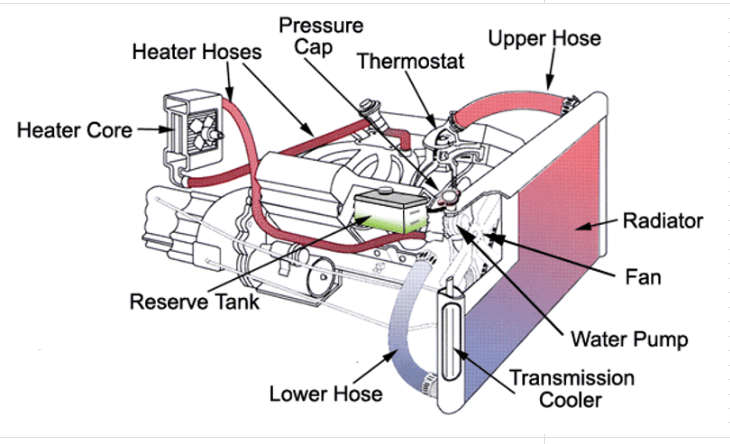
The cooling system prevents the engine from overheating by absorbing heat generated from combustion and releasing it into the atmosphere through the radiator.
The main components are the water pump, radiator, thermostat, and cooling fans.
The water pump circulates the coolant through the system.
The radiator spreads the coolant out over a large area to allow more heat to escape.
The fans pull cool air through the radiator allowing heat to escape more efficiently.
The thermostat opens and closes to block or allow coolant through the radiator to be cooled keeping the engine at it's optimum temperature.
Cooling
Fluids: Level, Condition, Contamination?
Was a pressure test completed? Where is the leak?
Any codes stored? List and define.
Any freeze frame data available? Date/Mileage?
Did the vehicle overheat? Any further damage?
Any previous engine repairs?
Any signs of impact damage or corrosion as the COF?
What is the root cause of overheating?
General Operation Principals
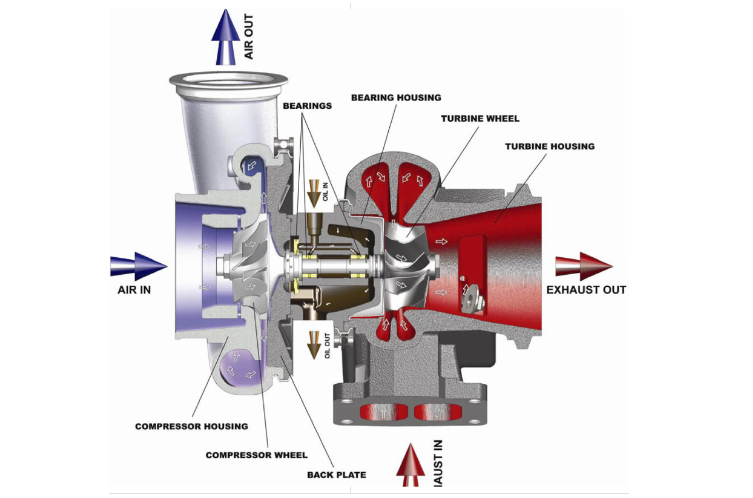
The Turbo uses exhaust gas to compress the air going to the intake allowing for more fuel to be used, creating more power.
The exhaust gases produced by combustion are routed to a turbine connected to a compressor making it spin.
The compressed air is cooled before being sent to the engine.
Compressed air has a higher density of oxygen which allows more fuel to be burnt which increases power output.
When there is more boost available than the engine needs, the wastegate opens to vent the uneeded boost pressure.
Turbo
Any codes stored? List and define.
Any freeze frame data available? Date/Mileage?
Any noise, smoke, etc?
Any play in the turbo shaft?
Wastegate and actuator operating properly?
Any previous engine repairs?
Oil or coolant leaks from turbo?
General Operation Principals
The battery is used to power the starter while the vehicle is not running.
While the engine is running, the alternator produces approximately 13.6 volts.
That voltage is what recharges the battery and provides power to all electrical components of the vehicle.
For any electrical component to operate, there must be voltage supplied (+) and a path for that voltage to return (-).
Electrical
Is there a check engine light or other warning lights?
Any codes stored? List and define.
Alternator/Battery test results?
Verified power and ground?
Any other circuit/pinpoint tests?
Any other potential causes tested?
Fluid intrusion/corrosion/damaged wires?
General Operation Principals
When the ignition is in the 'on' position, a signal is sent to run the fuel pump.
The pump pulls fuel from the tank, which passes through a filter on it's way to the pressure regulator.
The regulator provides consistant fuel pressure to the fuel rail.
The fuel rail supplies fuel to the injectors.
Control modules regulate the operation of the components.
Fuel
Is there fuel in the vehicle? Has fuel filter been serviced?
Power and ground to pump?
Fuel pressure test results?
Any codes stored? List and define.
Fuel pressure at fuel rail - Actual/Spec?
Is the injector stuck open, clogged or not functioning?
Any other testing performed?
General Operation Principals
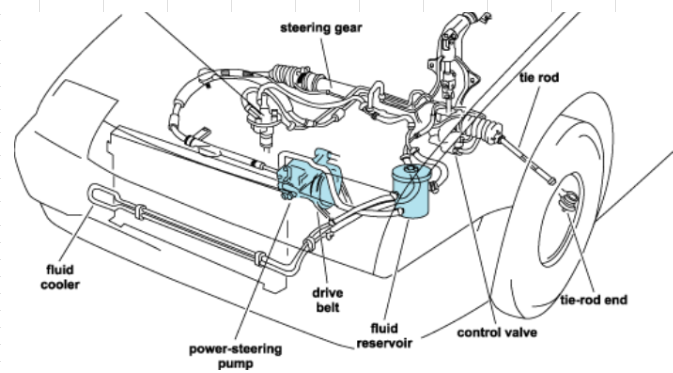
The steering wheel rotates a shaft which has a gear on the end called the pinion.
The rotational motion of the shaft is converted to transverse motion by meshing with a second gear called the rack.
The rack has a hydrualic piston with fluid supply lines on either side.
When the rack is moving in either direction, fluid is pumped into the opposite side of the piston.
The fluid pushes the piston in the desired direction using the pressure provided by the power steering pump.
The ends of the rack are connected to the steering knuckles via the inner and outer tie rod ends.
Steering
Any noises while turning, if so describe?
What is condition of tie rods, if damaged describe?
Power steering fluid level?
Any power steering leaks?
Any codes stored? List and define.
Any other testing performed?
Any signs of impact damage?
General Operation Principals
Vehicle suspension systems have many variations but serve the same purpose.
The steering knuckle attaches to the frame and steering mechanism via control arms and tie rods. It, also, houses the hub assembly.
Shocks will use either air or hydraulics to dampen the vibrations in the road.
The sway bar is a torsion spring that resists twisting and levels the vehicle during turns.
Ball joints bewteen the knuckle and control arm provide the flexability for movement.
Control arm bushings do the same for the other end of the control arm at the frame.
Suspension
Any suspension noises, if so describe?
Any signs of impact damage?
Signs of rust or corrosion as COF?
Any play in suspension components?
Are bushings worn, torn, cracked or dry rotted?
Diag type: test drive, visual inspection, leverage?
General Operation Principals
The 4 processes in A/C: compression, condensation, expansion, and evaporation.
The A/C compressor compresses incoming gas refrigerant increasing it's temperature and pressure.
The compressed gas travels to the condenser where heat is released and the gas is condensed to liquid form.
The high pressure liquid refrigerant is passed through a drier before arriving at the expansion device.
The expansion device is a restriction that controls flow in to a line of larger volume initiating the low pressure side, cooling the liquid even more.
The cool, low pressure liquid boils, becoming a gas in the evaporator as it absorbs heat from the cabin.
It returns to the compressor to complete the cycle.
Air Conditioning
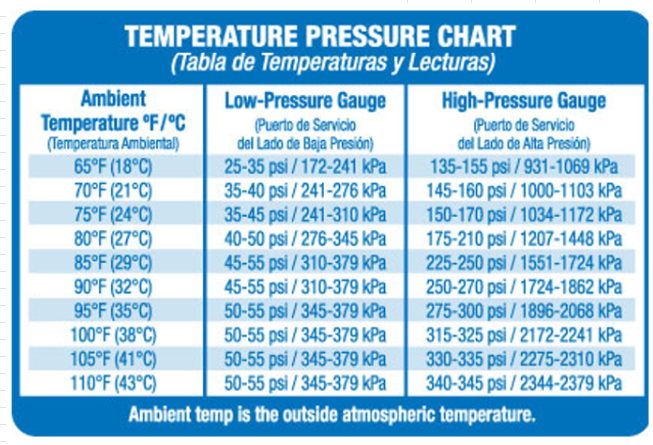
What is the ambient temperature/vent temperature?
Is there any refrigerant in the system?
How much refrigerant was recovered? What is the system spec?
Is the A/C compressor clutch activating?
What are the H/L side pressures? Are they out of range?
Was a leak test performed?
If leaking, where from? Any further damage?
Contamination in system? If so, send photos.
General Operation Principals
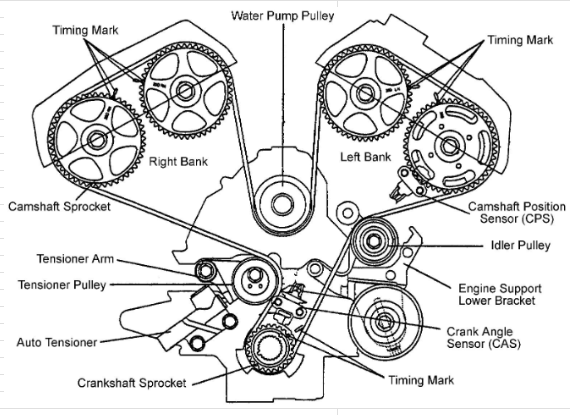
For an engine to operate properly, the components must operate at the proper time.
The relationship between the bottom end and valvetrain is maintained using a timing chain (or belt).
The timing chain tensioner keeps the chain tight so it doesn't skip teeth or come off.
The timing chain guides provide some additional tension and keep the chain from fluttering.
The timing chain can also be responsible for turning the water pump.
Timing
Any codes stored? List and define.
Any freeze frame data available? Date/Mileage?
Does the vehicle have a timing chain or belt?
If a belt was there maintenance performed at correct mileage?
Was there any damage to the engine from this failure?
Are there any noises from the chain or belt area?
Any previous engine repairs?
What is the COF?
CH Statement
Can you describe what happened?
When did the issue first occur?
Were there any prior related issues?
What were they and when did they occur?
Were there any warning lights?
Please describe:
Was there any noise, smoke, or smell?
Please describe:
How long have you owned the vehicle?
Do you know the approximate mileage when you purchased it? (If unsure, leave blank.)
Was the vehicle towed to the repair facility?
Where was it towed from and what tow company did you use?
Any additional comments or notes:
Transmission Authorization
MCE Type
Our Cost
Sequence
Labor
MCE Sourcing
Non-Cov/Denied
OOPC/Shipping
OOPC Cause
Requests
Verifications Provided
Auth Disclaimer
Display
Content
Size
Position
Custom Button
Delete Custom
Toggle List
Master Reset
Edit Display
Highlight the text you would like to modify.
Press the button to apply the effect
Change the font size using the + and - buttons
The text area in the upper left is for Repair Facility contact info.
The 'Payment' line is for the email or fax used for payment
'Distance' and 'Time' are Miles and Days in coverage.
The bolded words can be clicked to copy that line.
Clicking 'Payment' would copy the payment method, for example.
Side Navigation Menu
Clicking the hamburger icon will open the Side Navigation menu.
All of the items in the program can accessed through the menu.
The headers can be clicked to get to the general area of that tool.
Click anywhere to close the menu.
SOP Collection
Clicking 'Browse SOPs' will pull up all available SOPs.
Clicking an SOP name will display that SOP.
Click the 'Close' button in the top right to exit the SOP window.
Clicking anywhere will close the SOP menu.
Intake Section:
The section which includes 'Add Box', 'Clear', 'Next', 'Part', 'Labor', and 'Diag' buttons along with the 'Part Name', 'Part Number', 'RF Price', and 'OEM MSRP' text boxes is the 'Intake' section.
The failed component goes in the 'Part Name' box
The repair facility part number and price go in the associated boxes.
For additional components, click 'Add Box'.
For aftermarket parts, leave the 'MSRP' box blank.
After entering the info, click 'Part' to send an aftermarket template to the text area.
Filling out the 'MSRP' box will send a completed OEM template.
If the MSRP is over $250.00, the aftermarket sourcing template will be added on to the OEM template.
'Labor' and 'Diag' will send their respective templates to the text area.
Clicking 'Next' will shift all additional parts boxes down, clear the template, insert the next part into the primary part box and remove the unused part box.
Clicking 'Clear' will reset the 'Part Name', 'Part Number', and both price boxes, but not the other part boxes. This is useful when entering gaskets or other related parts that are required but not main failures.
Parts and Labor:
The other parts and labor buttons to the right of the lower text area the the same templates with a few additional
'Evac and Recharge' and 'Align' send a labor template for those operations.
The 'Bulk Fluid' button will send a blank bulk fluid template to the text area
If you are not sure of the price of the fluids, click the '$' sign to display the current fluid pricing sheet. Click it again to close.
'Copy P&L' will copy the entire text area and send it to the clipboard.
'Reset' will clear all templates, close all windows, and reset the whole program to starting position.
Authorization:
Clicking the 'Authorize Claim' button will start the Auth note builder.
Select which parts were used at what pricing, if anything was requested, and if there were any out of pocket costs, shipping, noncovered, or denied components or concerns.
If there was out of pocket costs, enter the amount in the pop up along with the reason.
The repair facility contact name and payment information will be automatically imported from the upper text area and inserted into the note.
Once 'Finish' is clicked, the note is copied to the clipboard.
Status Note:
Clicking the 'Status Note' button will show the status note builder.
Select the relevant options using the checkboxes and input any custom additions in the text area.
Click 'Submit' when finished.
PT Transfer:
Clicking 'Templates' then 'PT Transfer' will start the Powertrain Transfer template.
Answer the questions as they are presented.
The repair facility contact name and payment information will be automatically imported from the upper text area and inserted into the note.
The note is copied to the clipboard when the template is finished.
CH Statement:
Clicking 'Templates' then 'CH Statement' will start the Contract Holder Statement template.
Answer the questions as they are presented.
The note is copied to the clipboard when the template is finished.
Dynamic Note Creation:
The set of buttons labelled 'RF Inbound' and 'Called CH' are used to build 20+ dynamic notes in 3 clicks or less.
They emcompass a large swath of common situations that adjusters encounter on a daily basis.
Click through and read the labels clicked in order like a sentence.
The note generated can be edited or pasted as is depending on the situation.
The display box will automatically close after 5 seconds.
Straight to Clipboard Notes:
The other template buttons as well as the request buttons all set a specific note to the clipboard.
Appearance
Accessed through the settings menu, the appearance option screen allows you to customize the whole color scheme from shadows and background to gradient colors and angles.
There are several preset color schemes, as well.
Policy:
The 'Policy' button is a grouping of general infomation relevant to day to day operations.
Click on the tabs at the top to display the information.
Tools:
The 'Tools' button displays a set of tabs, each with it's own tool.
Quick Answers:
The 'Quick Answers' tab lists questions which display the answer when clicked.
The questions are a quick reference on where and how to accomplish some uncommon situations.
Mileage Discrepancy:
The 'Mileage Discrep' tab is an interactive tool that provides the correct actions to take per SOP for various mileage issues that occur.
Parts Pricing:
The 'Parts Pricing' tab is a similarly interactive tool which will guide adjusters through which part to price, from where, and at what pricing.
Diagnostic:
The 'Diagnostic' tab provides diagnostic assistance and general operating principles of that system.
Click the picture to enlarge and revert.
Tracker Tool
The 'Tracker Tool' tab is a tool that helps consolidate, organize, and analyze contract holder service records.
There is a dedicated line for inception and the Service Claim record as well as 5 additional records.
Each can be individually saved or deleted and they have their own collapsable note.
The options available can be run in any combination.
Check for Issues
'Check for Issues' will sort records by age and display in order.
The tool will set an alert if there are any mileage discrepencies, high mileage per day, early into coverage, or waiting period concerns.
It shows miles and days to or from inception, the average mileage per day, individual alerts, and the notes input by the adjuster.
Inception Estimate
The 'Inception Estimate' uses the inception info, service claim info, and the record which has the checkbox activated when saved to estimate the inception mileage.
It will output pertinent information related to the calculations.
Format for Note
'Format for Note' will display the entered info in a note friendly format which includes all records sorted and labelled clearly, any alerts found, as well as notes previously entered by the adjuster.
All information is per SOP guidelines.
Right-Click Menu:
New Buttons:
Selecting 'Custom Button' from the right-click menu will allow new buttons to be made.
Select the type of button to determine the action the button will take.
The 'Button Display' is the text that will appear on the button.
The 'Note Content' is what the button will output.
Clicking 'Submit' will create the button.
Right-clicking the button and selecting 'Delete Custom' will remove the button.
Display, Content, Size, and Position:
These options will modify only the button selected.
Use the menus and options available to modify the button.
Clicking 'Default' will reset the button to the original position.
Toggle list
Selecting this from the 'Settings' menu or the right-click menu will display a row of sliders that control the visibility of each button or a set of buttons.
There is also a slider for all buttons.
Master Reset:
The 'Master Reset' option will reset the entire program and all options to defaults.
Storage:
All settings and custom colors are saved regardless of browser open/closed, computer restarts, or updates.